Sales Dipped on Tuesday? See What Changed That Day
LiveMost reports tell you what happened. StoreWhy puts your WooCommerce numbers next to what changed on your site, so the likely reason is right there: a promo banner removed, a free-shipping bar switched off, a product out of stock, a price changed, a plugin updated. StoreWhy Pro, coming soon, finds the days worth a closer look for you.
How it works
Download & Install
On GitHub, click Code → Download ZIP, then upload the file under Plugins → Add New → Upload Plugin. WooCommerce must be active.
Open StoreWhy
Go to WooCommerce → StoreWhy. The last 30 days are filled in from your orders within a few minutes; product views count from activation.
Spot the Why
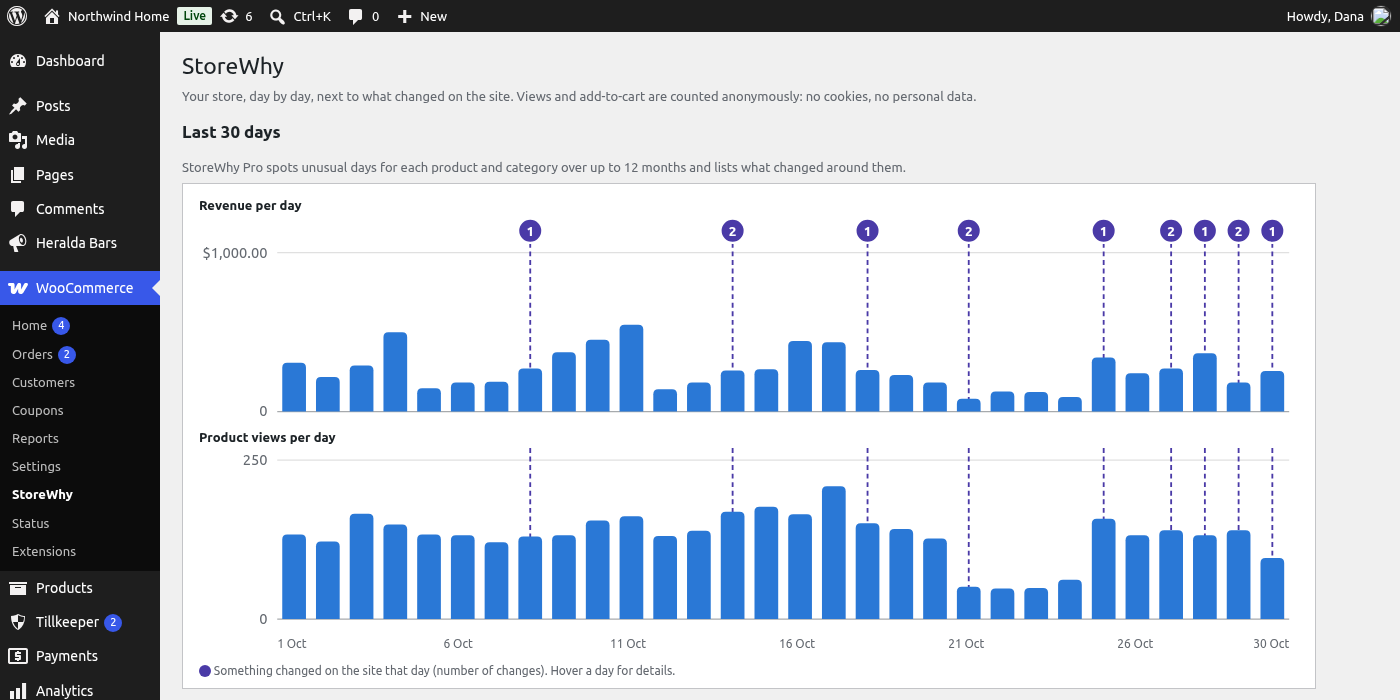
Look for the markers on the charts and read the changes listed next to each day. The change timeline records itself.
What's included
Charts with Change Markers
FreeRevenue and product views per day for the last 30 days, with a marker on every day something changed on the site.
Day-by-Day Table
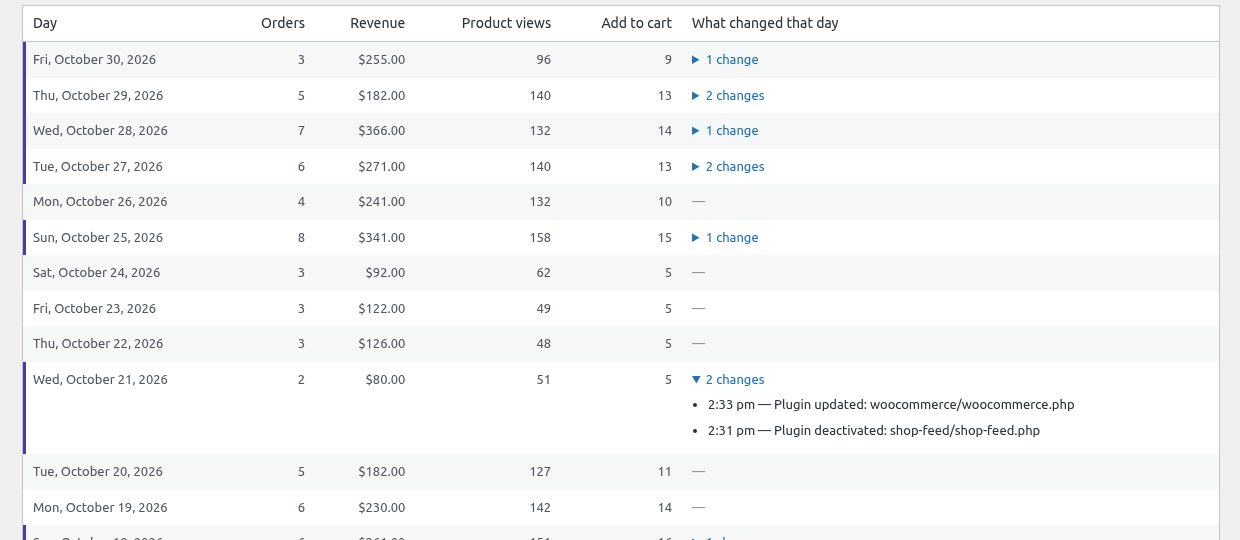
FreeOrders, revenue, product views and add-to-cart for each day, with the list of changes made that day right next to the numbers.
Top Products
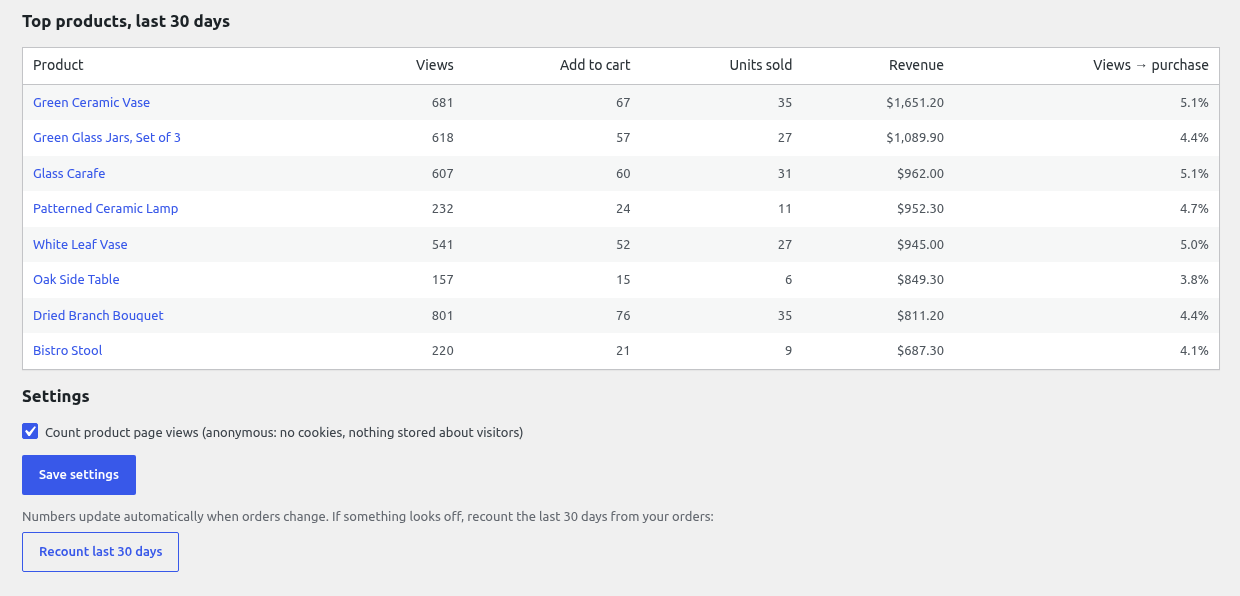
FreeViews, add-to-cart, units sold, revenue and a views-to-purchase rate for each product.
Automatic Change Timeline
FreeProducts published or taken offline, price, sale price and stock status changes, plugin and theme activations, switches and updates, pages published or taken offline.
More Detail with CognitoLab Plugins
FreeHeralda bars switched on, off or rescheduled, ProofBlocks banners, counters and pricing tables added to or removed from live pages, Filigrane setting changes, and changes AI agents made through Tillkeeper. Nothing extra to set up.
Always Up to Date
FreeA new order, a status change or a refund recounts that day in the background with WooCommerce's scheduler, never while a page loads. HPOS is supported.
Private View Counter
FreeA tiny script on the product page sends only the product ID — no cookies, no IP addresses. Bots, other sites, bursts of requests and store staff are ignored, and you can switch counting off.
Correlation, Not Blame
FreeStoreWhy shows what changed around a change in your numbers. It never claims one caused the other — that is for you to judge.
What Stood Out
ProComing soon. Unusual days for the whole store, each category and each product — revenue, units sold and views — compared with the same weekday over the four weeks before. Small numbers are ignored, and consecutive unusual days are grouped into one episode.
Changes Around Each Episode
ProComing soon. Changes to the same product or category first, then promotions, then site-wide changes such as plugin updates. When nothing changed on the site, StoreWhy Pro says so: the reason is probably outside the site.
Up to 12 Months
ProComing soon. Switch between 30 days, 90 days and 12 months, with a year shown by week and 12 months of sales history filled in from your existing orders.
Any Product on Its Own
ProComing soon. Revenue and page-view charts for a single product, with the changes that could concern it.
Frequently asked questions
Where do the order numbers come from?
Does it support High-Performance Order Storage (HPOS)?
Will it slow my shop down?
Do I need a cookie banner for the view counter?
What happens to my data if I uninstall?
Why download from GitHub and not WordPress.org?
When is StoreWhy Pro available?
Ready to See the Why Behind Your Numbers?
Download StoreWhy free from GitHub and open WooCommerce → StoreWhy: the last 30 days are filled in from your orders within minutes. StoreWhy Pro with automatic insights is coming soon.
Free · No cookies, no visitor data · All numbers stay on your site